Access Management#
Relevant controls: SC.01.01, SC.01.04, SC.01.06, SC.01.13, SC.01.14, SC.01.17, SC.01.18, DI.05.01
1. User Roles and Least Privilege#
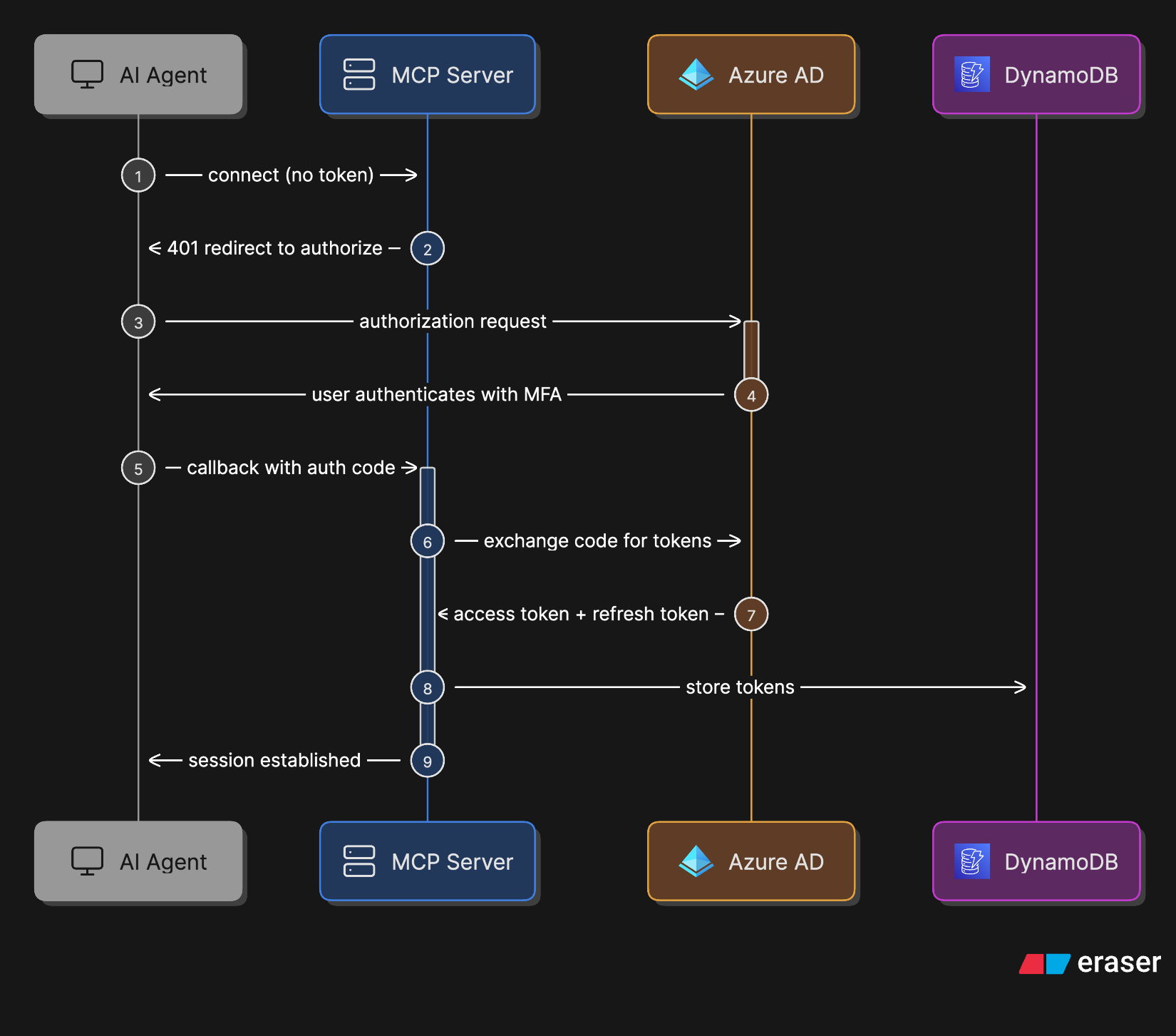
AI connectors uses two categories of principals: end users and service identities. There are no shared user accounts. All human access is individual and identity-bound via Azure AD.
End Users#
All Novo Nordisk employees are eligible to use AI connectors via their corporate Azure AD identity. Access to each MCP is controlled by the Azure AD enterprise application assignment — currently all MCPs are assigned to the "All Novo users" group (3bb6cc78-2024-419a-a6af-42c28127e12f), which covers all employees excluding sanctioned countries.
Users can only access data they are themselves authorised to access in the underlying system (SharePoint, Outlook, Teams, Databricks). This is enforced by the On-Behalf-Of (OBO) flow: the MCP calls Microsoft Graph or Databricks using a token derived from the user's own identity, not a service account. The MCP cannot access data the user does not have permission to see.
Platform Operators / Admins#
| Role | Who | Access scope |
|---|---|---|
| AWS account admin (human) | AI connectors team via ADMIN-XXXX + PIM |
Full access to dev (094069622854) and prod (673034950531) accounts via AWS SSO; used for infra/initial/ Terraform applies and emergency operations (see § 6) |
| GitHub Actions (automated) | Non-human OIDC roles | Two scoped roles: Terraform OIDC role (infra/main/ applies on push to main); per-MCP deploy role (ECR push + ECS update on release) |
Service Identities#
AI connectors uses no shared human-accessible service accounts. Runtime identity is handled exclusively via AWS IAM roles (ECS) and an Azure AD service principal per MCP — none can be assumed by humans.
| Identity | Type | Key permissions | Credentials |
|---|---|---|---|
mcp-{name}-execution-role |
AWS IAM role (ECS execution) | ssm:GetParameter for client ID + secret; kms:Decrypt via SSM |
None — assumed by ECS agent |
mcp-{name}-task-role |
AWS IAM role (ECS task) | firehose:PutRecord (audit log); DynamoDB CRUD on token cache table |
None — assumed by ECS task |
| MCP Azure AD app registration | Azure AD service principal | Graph API scopes (read-only, defined per MCP — see § 3) | Client secret stored in SSM SecureString |
No role has cross-MCP permissions. Each role can only access its own SSM parameters and DynamoDB table. Roles are defined in Terraform (infra/modules/mcp_server/iam.tf).
2. Authentication Flow#
All end-user requests to an MCP are authenticated via Azure AD OAuth 2.0. The diagram below shows the initial authorisation flow (how the AI Agent obtains a session):
Once the session is established, every tool call follows the flow below — including the server-side OBO exchange, token caching in DynamoDB, and audit logging to Firehose:
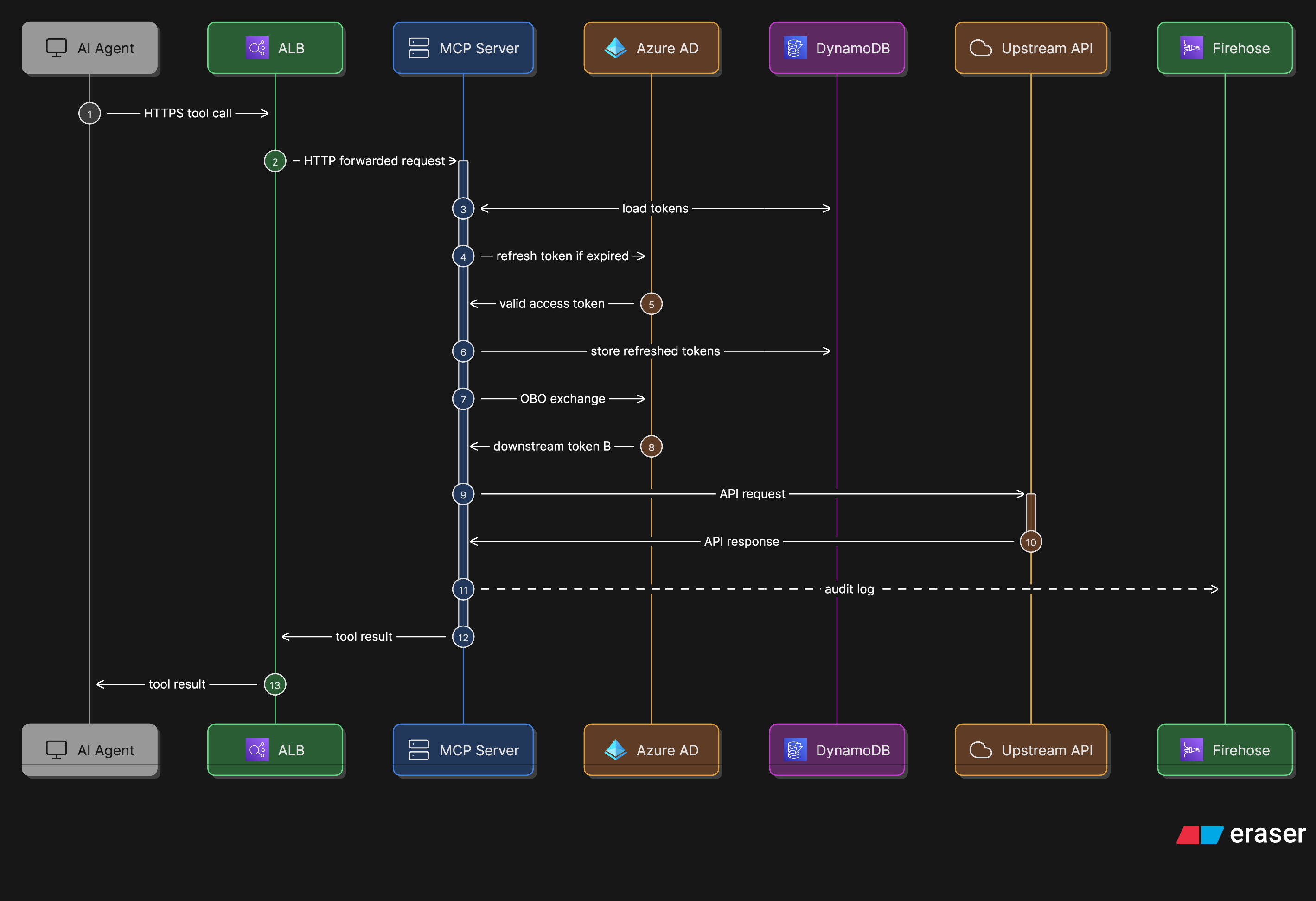
The key security property: Token B carries the original user's identity claims, so the MCP can only ever access data the user themselves is authorised to see — there are no app-only permissions.
3. Access Approval and Provisioning#
End User Access#
No individual provisioning is required — any employee can authenticate once the enterprise app is assigned to their group (see § 1 for current group assignment). To restrict access to a specific group, update the assigned group in Terraform (infra/initial/mcps/<name>/terragrunt.hcl) and apply via the infrastructure pipeline.
Privileged Access (Operators)#
AWS account access and Azure AD app registrations are provisioned as follows:
- AWS SSO — request via NovoAccess; approved by IT Infrastructure Manager or Owner
- Azure AD app registrations — each app registration is ordered via a ServiceNow RITM ticket by the IT Infrastructure Owner or IT Infrastructure Manager (the Azure AD team creates the object in Azure AD). The AI Connectors team then manages owners, scopes, and group assignments via the Azure AD portal using an ADMIN-XXXX account. The app registration is also imported into Terraform (
infra/modules/mcp_app_registration/) for state tracking.
4. Access Review#
| What | Frequency | Responsible | Process |
|---|---|---|---|
| End user group assignment (Azure AD) | Annually | IT Infrastructure Manager | Review which Azure AD group is assigned to each MCP enterprise application. Assess whether broad assignment is still appropriate or whether access should be scoped. |
| AWS account roles and policies | Annually | IT Infrastructure Manager | Review IAM roles, policies, and SSO assignments in both dev and prod accounts. Remove unused roles. |
| Azure AD app registration owners | Annually | IT Infrastructure Manager | Review owners, scopes, and group assignments in the Azure AD portal for each MCP enterprise application. Remove any stale or unexpected entries. |
| CI/CD deploy roles (GitHub Actions OIDC) | Annually | IT Infrastructure Manager | Review per-MCP GitHub Actions IAM roles and their trust policies. Remove roles for deprecated MCPs. |
Access rights should also be reviewed whenever a team member changes role or leaves the organisation.
5. Inactive Accounts#
End Users#
End-user access is tied to Azure AD group membership. When a Novo Nordisk employee is offboarded, their Azure AD account is disabled centrally by IT, which invalidates all active tokens. No separate process is required at the AI connectors level.
Token cache entries in DynamoDB expire automatically via TTL. No manual cleanup is needed.
Operator Accounts#
AWS SSO accounts for platform operators are managed centrally. The IT Infrastructure Manager must ensure that AWS SSO assignments are removed promptly when a team member leaves or changes role. This is reviewed as part of the annual access review (section 4).
6. Privileged Access (PIM)#
Privileged accounts with access to production infrastructure are managed via the Novo Nordisk PIM solution. PIM provides a time-limited vault for privileged credentials — admin passwords are temporary and valid for 8 hours.
All privileged cloud access requires a separate ADMIN-XXXX account (not the standard corporate account). MFA is required at every level of interaction with cloud providers, including obtaining the admin password from PIM. The team uses YubiKeys as the primary MFA method.
Access to privileged accounts is requested via NovoAccess and granted based on role and need. A current list of all privileged users can be extracted from NovoAccess at any time.
| Privileged role | Access path | MFA required |
|---|---|---|
AWS prod account admin (673034950531) |
ADMIN-XXXX account via PIM (8h time-limited) | Yes — YubiKey |
AWS dev account admin (094069622854) |
ADMIN-XXXX account via PIM (8h time-limited) | Yes — YubiKey |
Terraform — infra/initial/ (manual) |
AWS SSO profiles via ADMIN-XXXX account; access tokens in SSM Parameter Store (encrypted) | Yes -— YubiKey |
Terraform — infra/main/ (automated) |
GitHub Actions OIDC role — no human login; triggered on push to main | Yes |
| Per-MCP deploy role (automated) | GitHub Actions OIDC role — ECR push + ECS update only; scoped per MCP | Yes |
| Azure AD app registration management | Azure AD portal via ADMIN-XXXX account (PIM, 8h time-limited) | Yes — via Azure AD Conditional Access |
7. Multi-Factor Authentication#
MFA is enforced for all human access via Azure AD Conditional Access policies applied to the Novo Nordisk tenant (fdfed7bd-9f6a-44a1-b694-6e39c468c150). This covers:
- End-user authentication to MCP enterprise applications
- Privileged access (ADMIN-XXXX / PIM) to AWS — MFA required at PIM checkout and again at AWS SSO sign-in (federated through Azure AD)
- Azure AD portal access for app registration management
No additional MFA configuration is required at the AI connectors level — MFA is inherited from the central Novo Nordisk Azure AD policy.
8. Sensitivity-Based Access Filtering#
In addition to Azure AD-enforced access control, AI connectors applies runtime content filtering to prevent highly sensitive data from being surfaced to AI agents regardless of the user's own access rights.
| MCP | Mechanism | Default behaviour |
|---|---|---|
| SharePoint | Allowlist — permitted sensitivity labels configured in config.yaml |
Unlabelled or non-permitted labels: content redacted, metadata visible |
| Outlook | Denylist — blocked sensitivity label GUIDs configured in config.py |
Blocked NN Strictly Confidential labels: body redacted, metadata visible |
This is an additional data protection layer on top of, not a replacement for, Azure AD access controls.